Geriatrics At Your Fingertips
- 4.9
- Rating
- 10.00K
- Installs
- Free
- Price
 Analysis by App-foxy
When I review a medical reference app, I look for one practical question first: does it help me make a better decision at the moment I need it, or does it simply place a long block of information on a phone screen? Geriatrics At Your Fingertips is aimed at healthcare providers who care for older adults, and I found its value is closely tied to how, when, and where I use it. It is not a general wellness app for families, nor is it a substitute for clinical training. It is a focused reference tool from the American Geriatrics Society, designed for quick consultation in geriatric care.
The app sits in the Medical category and is free to install, with optional in-app purchases listed at $19.99 per item. Its age rating is Everyone, but the intended audience is clearly professional: clinicians, students in health-related fields, and other care providers who regularly encounter the particular medication, assessment, and treatment questions that come with older patients. I would not recommend treating the app as a diagnosis engine. I would recommend it as a compact companion for checking geriatric information while working through a real case.
How the app fits into a connected clinical routine
I find this app most useful when it has a clear supporting role in a larger care routine: I can consult a focused geriatric reference, then bring the relevant question back to the patient record and the rest of the team. That handoff is important because a quick reference can guide what to check without supplying the full context needed for a decision. The next section looks at how I would keep that distinction clear in day-to-day work.
You May Also Like

 Pandora - Music & Podcasts
Pandora’s Music Is Easy to Start, but Harder to Recover
Pandora’s strength is its low-effort path from a seed to a station. Its weak spot is how much confidence it asks you to place in connection, setup, and quiet recovery.

 8 Ball Pool
 Is Built on Rivalries, Rematches, and Routine
A close look at the rivalries, rematches, shared routines, and unanswered safety questions that turn a quick pool match into a persistent mobile community.

 Samsung Music
’s Quiet Strength Is Playing What You Already Own
Its reach comes less from spectacle than from dependable access to a personal library. That simplicity is both the app’s strongest retention engine and its ceiling.

 AccuWeather: Weather Radar
AccuWeather Review: A Quick, Clear Forecast for Everyday Decisions
For everyday plans, the best forecast is the one you can understand quickly. AccuWeather makes rain timing, radar, and local conditions easy to act on, with a few trade-offs.

 Hill Climb Racing
Why Hill Climb Racing Still Turns Crashes Into One More Run
A tiny car, a bumpy hill and one more upgrade: Hill Climb Racing keeps resurfacing because its simple chaos makes every near-miss feel personal.

 AliExpress - Shopping App
AliExpress Makes Global Shopping Feel Personal, but Shoppers Bear the Risk
AliExpress turns a global marketplace into a pocket-sized discovery engine. Its reach is useful, its shopping loop compelling, and its trade-offs easy to miss.
More From Our News Desk
View All News


Useful when the network is part of the workflow
Connectivity shapes the experience more than it might seem from such a short store description. A reference app can feel immediate when the phone has a reliable connection, but the practical value depends on whether the information you need is already available at the moment you open it. In a clinic, hospital, classroom, or home-care visit, that distinction matters. A busy professional may have only a brief pause to look something up, and a slow connection can turn a quick reference task into an interruption.
I found it best to approach this app as a focused reference stop rather than as the only source in a complete clinical workflow. If I am reviewing an older adult’s medication list, preparing for a consultation, or thinking through an assessment question, the app can help organize the next question I should ask. It is especially useful when the issue is specifically geriatric rather than a broad medical topic. That focus is its main strength: it encourages me to consider age-related risks instead of applying a younger-adult answer automatically.
There is also a useful professional habit here. I can consult the app before speaking with a patient, then return to the patient’s history, current medicines, functional status, and goals. The reference does not replace that conversation; it helps me avoid overlooking a geriatric consideration. In my experience, that is a better use of a mobile medical tool than trying to make it deliver a complete answer in isolation.
What happens in mobile contexts
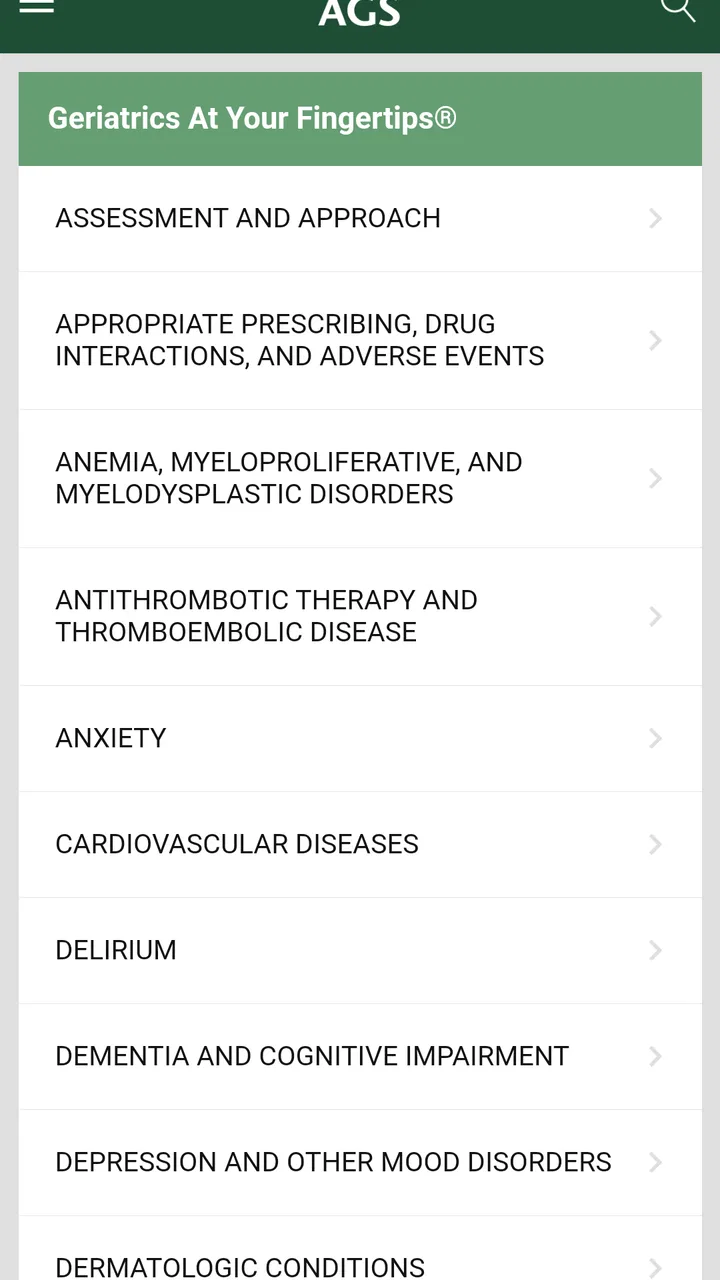
The phone format makes the app more convenient than carrying a printed reference, particularly during rounds or while moving between appointments. A printed book can be dependable, but it is bulky and becomes outdated as soon as its content changes. A general web search is flexible, yet it often produces a noisy mixture of commercial pages, patient material, and results that are not tailored to older adults. This app occupies a useful middle ground: more targeted than a search engine and easier to carry than a specialist handbook.
That convenience has limits. Reading a medical reference on a small screen is not the same as studying a subject at a desk. I would use it for a targeted check, not for learning an entire geriatric topic from scratch. Long reading sessions can be tiring, and the phone itself creates distractions. If I need to compare several sources, examine detailed evidence, or teach a complicated concept, a larger screen and a full clinical resource are usually better choices.
A realistic example is a home-care visit. I might be reviewing an older patient’s medicines and notice a concern involving confusion, falls, sedation, or difficulty managing treatment. Instead of relying on memory alone, I can use a focused geriatric reference to frame what deserves closer attention. I would then verify the result against the patient’s complete record and local clinical guidance. The app is valuable in that sequence because it supports thinking; it should not be the final authority in the sequence.
Handling interruptions, weak connections, and recovery
One of the most important questions for any mobile medical reference is what happens when the connection is unreliable. I do not treat connectivity as a minor technical detail. A clinician may be in a basement treatment area, a rural home, a crowded ward, or a building with inconsistent reception. If an app requires a live connection at a particular moment, that requirement can affect whether it is genuinely useful in practice.
For that reason, I would test the app in the places where I expect to use it before depending on it during patient care. Open the sections you commonly consult, move between screens, and see how it behaves when the connection becomes slow. It is also sensible to keep a trusted backup reference available, especially for urgent decisions. That is not a criticism unique to this product; it is a basic safety habit for any digital medical resource.
Recovery matters as much as initial access. If an interruption occurs while I am checking a topic, I want to be able to return to the task without losing the clinical question that brought me there. My practical approach is to remember the exact topic I was checking, avoid treating a partially loaded page as complete, and verify the information again after the connection returns. I would never make a medication or treatment decision from an interrupted display.
This is also where the app’s role becomes clear. It works best as one layer in a wider process that includes professional judgment, patient records, prescribing references, and local protocols. Someone looking for a single app that remains fully dependable in every network condition may prefer a resource whose offline behavior and update process are explicitly suited to that need. For me, the sensible choice is to use this app for focused support while keeping a second route to essential information.
Using it without wasting mobile data
Medical reference use does not usually require constant browsing, but repeated searches, updates, and downloads can still matter to someone using mobile data. I would install or update the app over a trusted Wi-Fi connection, then make a habit of checking it before a shift or visit rather than opening it repeatedly in a poor-signal area. That reduces avoidable delays and makes the app feel more predictable.
I also prefer a deliberate search routine. Before opening the app, I identify the patient-related question in plain language: am I checking a medication concern, an assessment approach, a symptom, or a broader management issue? A precise question helps me spend less time jumping between unrelated sections. It also prevents the common mistake of treating a quick reference tool like an endless browsing feed.
Data-conscious use is not only about saving bandwidth. It encourages safer attention. If I am standing with a patient, I do not want to spend several minutes scrolling through loosely related material while missing the person’s actual concerns. I use the app to generate a focused prompt, then return to the patient and the clinical record. That workflow makes the phone less intrusive and the information more useful.
Version, access, and who should install it
The current version is 6.9.0.839, and the app requires Android 8.0 or later. That makes the operating-system requirement important for anyone using an older device supplied by a clinic, school, or workplace. Before planning a deployment across several phones, I would check the Android versions on those devices rather than assuming every handset can run it.
The app has been available since April 17, 2014, which gives it the profile of an established reference rather than a newly launched experiment. Its average rating is 4.9, based on over 160 ratings, and it has passed 10 thousand installs. Those figures suggest strong satisfaction among the people who chose to rate it, but I would still judge it by fit: a high rating does not turn a specialist tool into a complete medical information system.
The free entry point is helpful for trying the basic experience, while the optional purchases at $19.99 per item deserve attention before a department recommends it widely. I would check which material is included in the version I plan to use and whether the paid items match my role. A student may need a different level of access from a geriatrician or a multidisciplinary care team. The right question is not simply whether the download costs nothing, but whether the specific reference content needed for daily work is available within the chosen setup.
Three practical habits that improve the experience
First, I would use the app before a consultation to prepare rather than opening it only after a problem appears. A quick review of the relevant geriatric topic can help me arrive with better questions about function, cognition, medication burden, and the patient’s priorities. This is more effective than searching in front of the patient without a clear purpose.
Second, I would separate reference checking from final verification. If the app points me toward a concern, I would confirm it using the patient’s current record and the clinical resources required by my workplace. This two-step method is particularly important when a recommendation may be affected by kidney function, frailty, interactions, allergies, or a treatment goal that is not visible in a short mobile entry.
Third, I would create a personal list of recurring topics outside the app, such as a secure study note or a printed workflow checklist approved by my organization. I would not copy sensitive patient information into an unapproved note. The purpose is simply to remember which subjects deserve review before future visits. That turns occasional app use into a repeatable learning routine without pretending the app is a full record system.
Where it is a strong choice—and where it is not
I think Geriatrics At Your Fingertips is a strong choice for healthcare providers who need a portable geriatric reference and already understand how to interpret clinical information. It is also a sensible companion for learners who want to connect classroom knowledge with the questions that arise in older-adult care. Its focused identity makes it more relevant than a generic medical search when the patient’s age, function, medication sensitivity, or multiple conditions change the decision.
I would be more cautious recommending it to a family caregiver seeking direct treatment instructions. The Everyone rating describes accessible content classification, not professional suitability. A non-clinician may find terminology difficult or may apply a general recommendation to a situation that needs individual assessment. In that case, a plain-language patient resource and advice from a licensed professional would be safer.
I would also choose another tool when I need a full prescribing database, comprehensive interaction checking, detailed evidence citations, institution-specific protocols, or a guaranteed workflow in areas with poor connectivity. A broad clinical platform may be better for those tasks, even if it is less focused and less convenient. Likewise, a textbook or larger-screen resource wins when I am studying a topic deeply rather than checking one practical point.
My connectivity verdict
After looking at the app through the realities of mobile use, my view is positive but measured. Its strongest role is as a focused geriatric reference that can sit beside a professional’s existing workflow. The phone format makes it easier to consult than a large book, and its specialist focus is more useful than a random web search when the question involves older adults. The main trade-off is that I would not build a safety-critical process around any uncertain connection behavior or use it as the sole clinical authority.
My recommendation is to treat it as a quick, focused companion—not as a replacement for clinical judgment, patient records, or a complete medical database. If you are a healthcare provider working with older adults, the free installation gives you a practical way to evaluate whether its reference style fits your routine. Just test it on your own device, consider the Android requirement, review the optional purchase structure, and keep a dependable backup for moments when the network or the app is not ready.
That balance is what makes the app worthwhile for me. It does not need to do everything to be useful. It needs to help me ask a better question, notice a geriatric issue I might otherwise miss, and return quickly to the patient. Used with that expectation, Geriatrics At Your Fingertips earns a place among the mobile tools I would consider for older-adult care.
FAQs for Geriatrics At Your Fingertips
01What is Geriatrics At Your Fingertips designed for?
Geriatrics At Your Fingertips is a clinical reference app intended to help healthcare professionals quickly review information related to older-adult care. It typically covers geriatric assessment, common syndromes, medication considerations, preventive care, and practical treatment guidance. The app is best viewed as a point-of-care educational resource rather than a replacement for a complete medical record, specialist consultation, or individualized clinical judgment.
02Who can benefit from using Geriatrics At Your Fingertips?
The app is primarily aimed at physicians, nurses, pharmacists, medical students, residents, and other healthcare professionals who work with older adults. Its concise organization can be useful when reviewing geriatric concepts during training or clinical practice. General users and caregivers may find some topics informative, but the terminology and recommendations are generally written for a professional audience and may require prior medical knowledge to interpret safely.
03Does the app provide current and reliable medical information?
Geriatrics At Your Fingertips is designed as a trusted reference based on established geriatric knowledge, but users should verify the edition, update date, and publisher information available in the app store or within the application. Medical recommendations can change as evidence and guidelines develop. Before making a treatment decision, especially involving medication, dosage, or a complex patient, compare the content with current local guidelines and consult an appropriately qualified professional.
04Can Geriatrics At Your Fingertips replace a doctor or medical consultation?
No. The application should not be used to diagnose a person independently, prescribe medication, or replace an examination by a physician or another qualified healthcare provider. Older adults often have multiple conditions, changing kidney or liver function, and complicated medication regimens, so recommendations must be adapted to the individual. Use the app as a supporting reference and seek professional advice for urgent symptoms or personal medical decisions.
05What should I check before downloading the app?
Before downloading, check whether your Android or iOS version is supported, how much storage the app requires, and whether the full reference content requires a purchase, subscription, or additional in-app payment. Also review the listed update date, privacy details, and whether content is available offline. Because medical reference apps can vary by edition and region, confirm that the version offered matches your professional needs and preferred clinical guidelines.
Pros
- Quick access to geriatric reference information while working with older adults.
- Useful for reviewing common conditions
- medications
- and clinical considerations.
- Searchable content can save time compared with checking printed references.
- Designed for healthcare professionals rather than general wellness users.
- Convenient offline reference potential in settings with limited connectivity.
Cons
- Some content may require a paid subscription or in-app purchase.
- Medical information should be verified against current clinical guidelines.
- The interface may feel dense for users unfamiliar with medical terminology.
- Not a substitute for individualized assessment or professional clinical judgment.
- Updates and compatibility may vary between Android and iOS versions.

Geriatrics At Your Fingertips
Gallery